
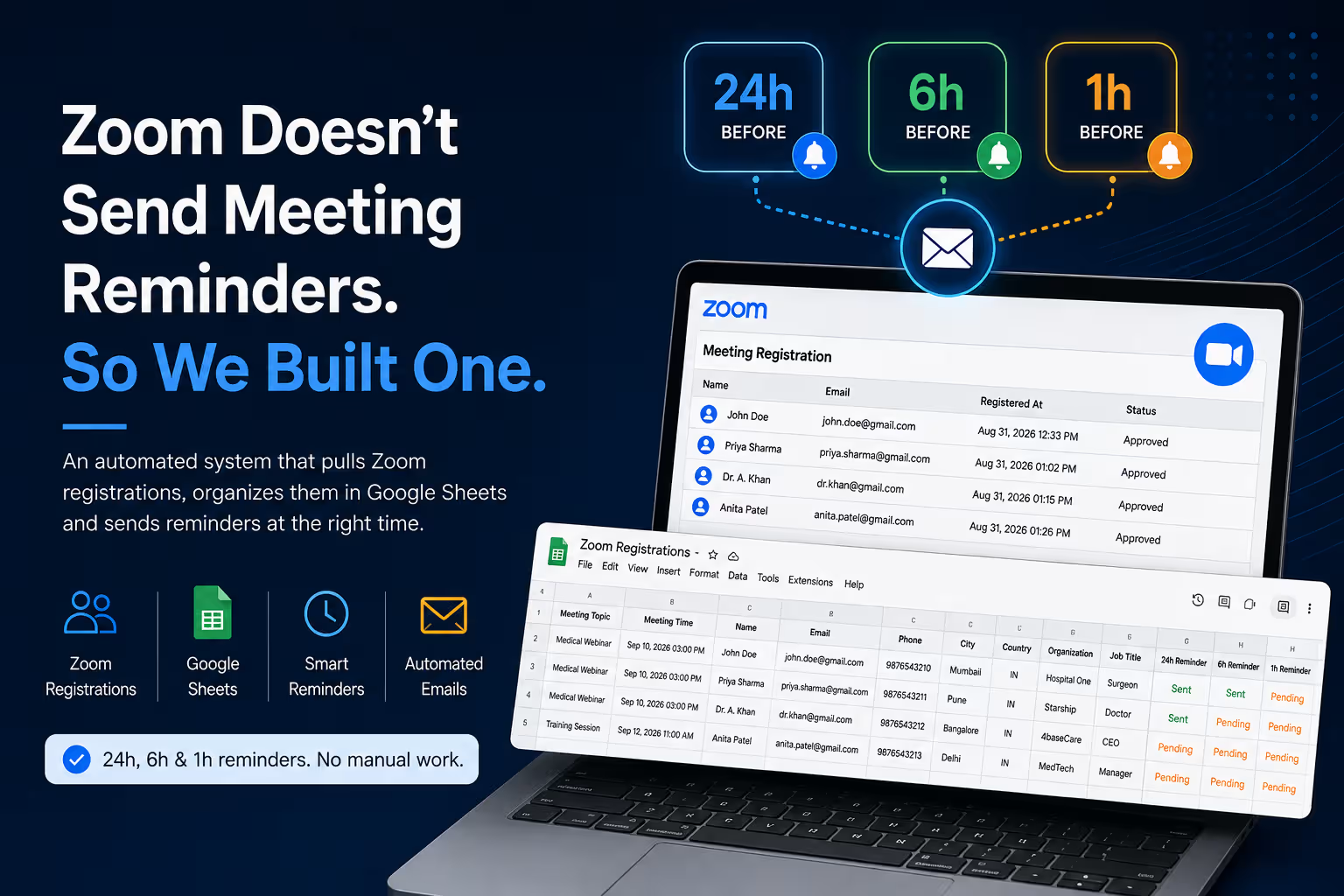
Zoom Doesn't Send Meeting Reminders. So We Built One.
Zoom handles meetings and registrations well. But when you need structured reminders for registered participants, there is a gap. We built an automated system to fill it.
If you host Zoom meetings regularly, there is a surprisingly simple problem you eventually run into:
People register for the Zoom meeting — and then forget about it.
A registration confirmation tells someone that they have successfully registered. But that does not necessarily mean they will remember the meeting when the time arrives.
For webinars, medical meetings, training sessions, consultations, corporate presentations and other registration-based meetings, reminders can make a significant difference to attendance.
The problem is that sending those reminders manually becomes another administrative task.
The Problem We Wanted to Solve
The requirement was straightforward:
Track Registrations
Automatically retrieve people who register for upcoming Zoom meetings.
Know the Schedule
Match every registered participant with the correct meeting and meeting time.
Send Reminders
Automatically email participants before the meeting without anyone having to remember to do it.
The system needed to work continuously in the background. A new registration should not require someone to manually copy information into a spreadsheet or schedule an individual reminder.
Our Solution
We built an automation that connects Zoom registrations with Google Sheets and an automated email reminder system.
Zoom Registration
A participant registers for an upcoming Zoom meeting.
Automatic Sync
The system periodically checks Zoom and pulls new registration information automatically.
Google Sheets
Participant information is organized in a central Google Sheet, including contact and meeting details.
Reminder Check
The automation continuously checks upcoming meetings against the required reminder windows.
Automated Email
The participant receives the appropriate reminder automatically.
Three Reminder Windows
The system currently works around three key reminder points before an upcoming meeting:
Because the automation checks periodically rather than relying on an exact second, each reminder operates within a defined time window. This allows the system to catch the appropriate reminder even when a participant registers relatively close to the meeting.
If someone registers only a few hours before a meeting, they can still receive the applicable upcoming reminder rather than being ignored because they registered late.
It Also Knows When Not to Send a Reminder
One important part of the automation is that it does not simply send reminders based on registration time.
The system checks the actual meeting time before sending anything. Meetings that are already in the past or are currently taking place are skipped.
This prevents old registrations and completed meetings from accidentally triggering reminder emails.
The Spreadsheet Updates Automatically Too
The Google Sheet is not intended to be manually maintained.
The automation periodically retrieves registration data from Zoom and adds new registrations to the spreadsheet. This means a new meeting or a new participant can appear in the sheet without someone having to manually copy the information.
Depending on the registration form configured for the Zoom meeting, the system can also pull additional participant information such as:
Participant first and last name.
The email associated with the registration.
Telephone information when collected by the registration form.
City and country/region when provided.
Organization information collected during registration.
Professional title when included in the registration form.
Reminder Status Is Tracked
Each participant has separate status fields for the three reminder stages.
| Participant | 24h Reminder | 6h Reminder | 1h Reminder |
|---|---|---|---|
| Registered Participant | Pending / Sent | Pending / Sent | Pending / Sent |
Once a reminder is sent, the corresponding status is recorded. This provides a simple way to see which reminders have already been processed and helps prevent the same reminder from being sent repeatedly.
Why Automate It?
No Manual Tracking
There is no need to maintain a separate list of participants or manually check who needs a reminder.
Fewer Missed Meetings
Participants receive multiple opportunities to remember the upcoming meeting.
Centralized Data
Registrations and reminder statuses are available in one organized Google Sheet.
Most importantly, once the system is configured, the workflow runs in the background instead of becoming another recurring task for the meeting organizer.
From a Simple Gap to a Working Automation
The original problem was not complicated: people register for a Zoom meeting, but they may forget about it later.
The solution was to build the missing layer around the existing Zoom workflow rather than replace it.
Zoom continues to handle the meeting and registration. The automation handles the ongoing participant tracking, spreadsheet organization and reminder emails.
Zoom manages the meeting. Our automation makes sure people remember to attend it.
Frequently Asked Questions
Does Zoom send meeting reminders automatically?
Zoom provides registration and meeting-related functionality, but it does not provide the type of customized, multi-stage participant reminder workflow described in this system. This automation adds that reminder layer.
What reminders does the system send?
The workflow is designed around three reminder points: 24 hours, 6 hours and 1 hour before the meeting.
What happens if someone registers shortly before the meeting?
The system checks the remaining time before the meeting and sends the applicable upcoming reminder. For example, someone registering a few hours before a meeting can still receive the 1-hour reminder.
Will it send reminders for meetings that have already happened?
No. The system checks the meeting time and skips meetings that are already past or currently in progress.
Does the Google Sheet update automatically?
Yes. The automation periodically synchronizes Zoom registration information and adds new registrations to the spreadsheet.
Can phone numbers and other registration fields be collected?
Yes. When those fields are enabled and collected by the Zoom registration form, the automation can pull them into the Google Sheet along with the other registration information.
Can this workflow be used for other clients?
Yes. The workflow can be configured for other Zoom meeting hosts and organizations, with the relevant Zoom account, registration settings, spreadsheet and email configuration.
Does the organizer have to manually send each reminder?
No. Once the automation is configured and running, reminder checks and email delivery are handled automatically.